
-
jqModal is a plugin for jQuery to help you display notices, dialogs, and modal windows in a web browser. It is flexible and tiny, akin to a "Swiss Army Knife", and makes a great base as a general purpose windowing framework.
links for 2008-08-06 [delicious.com]
Standard-
With Google Insights for Search, you can compare search volume patterns across specific regions, categories, and time frames.
Mashup.se – about mashups and APIs in Swedish
StandardLast week I finally relaunched mashup.se. I have had that domain for a couple of years now and started my blogging there in 2006. But I was never happy with the content and the direction it took, in the end it became nothing more than general tech news and I lost interest. Now, at the relaunch, it is much more focused. The idea is to write about mashups and APIs from a swedish angle (yes, the site is all in Swedish, but thanks to Google Translate that is no problem, click here for the English version). There are so many mashups and APIs, but most of them are from the US and have very US specific content. An API that only produces content about the US in English is of very little help to a developer writing apps for the Swedish market.
Hopefully I can create a good collection of swedish mashups and APIs and at the same time get to know more what is going on in Sweden. Since I am not only going to write about specifically Swedish stuff, but also US APIs that are of interest to Swedes, I think that it will also help me write more posts for digitalistic.com. After all a mashup built with Yahoo’s BOSS mashup framwork is of interests to geeks everywhere (at least if you are the kind of geek I am).
links for 2008-08-04 [delicious.com]
Standard-
17 Google Maps Mashups To Waste Away Your Day
Writing an iPhone page in minutes using IUI
StandardThe 3G iPhone was released a few weeks ago, so it’s time to write a page or application for the iPhone and try to ride the hype wave for all it is worth. So I started working on an iPhone specific page for enlatele.com.mx – after all why shouldn’t Mexicans be able to find their TV-schedule on their iPhone? You can see the finished result on iphone.enlatele.com.mx. Since all I want to do is show web based content in the iPhone there is no need to start using the iPhone API and build an actual application, so instead I built a web page aimed specifically at the iPhone, and it was suprisingly easy!
Some general lessons I learned before we jump into the actual code:
- iPhone pages are all about lists, the more lists the better apparently. On the smaller screen you can not really do much more than lists, and if you want to do more then just let the iPhone user browse your normal web page.
- Write a seperate page for the iPhone, do not detect if a site visitor is using the iPhone and automatically server up the iPhone page. One of the cool things about the iPhone is that it is possible to interact with normal web pages quite well on a small screen, dont take this away from the iPhone user. Instead create a subdomain specifically for this, for example iphone.enlatele.com.mx, or m.enlatele.com.mx.
- The iPhone connection is not always the best, so do not serve lots of images etc if there is not a real need for it. This might not be true with the new 3G iPhone in the middle of New York or Stockholm, but writing an iPhone page for Mexico I’d rather be safe than sorry and keep the number of images to a minimum.
I used just HTML, CSS and JavaScript, packaged up very nicely in the IUI framework. Basically all you do is download a CSS file and a JavaScript file, import them into your HTML page and write lists with certain CSS classes and IUI takes care of all the rest. IUI even has minimized versions of the CSS and JavaScript file you can use to make the page even smaller (and thus a quicker download to the iPhone). This is what I have in the header of my page:
<meta name="viewport" content="width=320; initial-scale=1.0; maximum-scale=1.0; user-scalable=0;"/>
<style type="text/css" media="screen">@import "iui/iuix.css";</style>
<style type="text/css" media="screen">@import "styles.css";</style>
The meta tag “viewport” is needed to let the Safari browser on the iPhone know how to deal with the content, without that tag you risk that the page acctually looks worse in the iPhone than in a regular browser.
In the body of my HTML document I specify the menus of my iPhone, ie lists lists and more lists. The code for the start menu is:
<ul id="home" title="Enlatele.com.mx" selected="true">
<li class="group">Canales</li>
<li><a href="channelgroup.html?=canales_abc">A-B-C</a></li>
<li><a href="channelgroup.html?=canales_def">D-E-F</a></li>
<li><a href="channelgroup.html?=canales_ghi">G-H-I</a></li>
<li><a href="channelgroup.html?=canales_jkl">J-K-L</a></li>
<li><a href="channelgroup.html?=canales_pqr">P-Q-R</a></li>
<li><a href="channelgroup.html?=canales_stu">S-T-U</a></li>
<li><a href="channelgroup.html?=canales_vwxyz">V-W-Y-X-Y-Z</a></li>
<li class="group">Proveedores</li>
<li><a href="#sky">Sky</a></li>
<li><a href="#cablevision">Cablevision</a></li>
<li><a href="#mastv">MASTV</a></li>
<li><a href="#tvabierta">TV Abierta</a></li>
</ul>
And this results in this page (as can be seen on iphone.enlatele.com.mx):
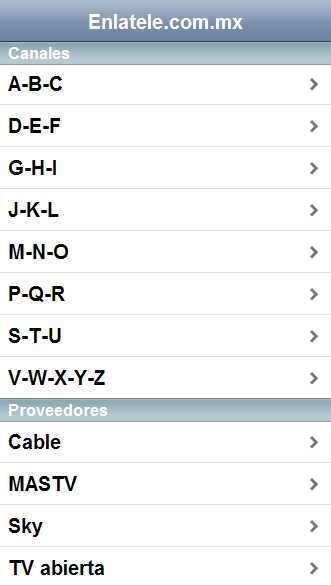
IUI styles it all nicely. The key parts of this list is:
- the id “home” on the ul tag. Ids like this are used throught IUI to identify submenus etc. For example the link to Sky is
<a href="#sky">Sky</a>this links to another ul list on the same page with the id “sky” –<ul id="sky" title="Sky">. This means that I can have most of my menu structure, submenus and all, on one page. So once this page is downloaded to the iPhone the phone do not need to access the internet just because you click on a link to a submenu. -
title="Enlatele.com.mx"is the header of the page -
selected="true"on the ul means that this is the first menu to load. -
<li class="group">Canales</li>creates a grouping in the menu, a nice way to make things look fancy without acctually doing any work - now to a really nice thing about IUI, it takes care of loading content dynamically into your current page seamlessly. For the enlatele iPhone page there are listings of TV channels that are not loaded to the iPhone unless the user clicks on a link in the menu to do this. So if a user wants a list of all channels that starts with A, B or C he would click on the following link in the menu –
<li><a href="channelgroup.html?=canales_def">D-E-F</a></li>. IUI would then insert the content of channelgroup.html into the page basically using AJAX (don’t worry about the ?=canales_def – that is just so that the enlatele backend knows what to load). The channelgroup.html page should _only_ contain a list of channels to show once this link is clicked, nothing else:
<ul id="canales_abc" title="Canales A-B-C">
<li><a href="channel.html?canal=a_e_mx_west">A&E MX West</a></li>
<li><a href="channel.html?canal=american_network">American Network</a></li>
<li><a href="channel.html?canal=animal_planet_latinam">Animal Planet LatinAm</a></li>
<li><a href="channel.html?canal=animax">Animax</a></li>
</ul>
So no HTML start tags or BODY tags or anything else, just the list you see above, that is the whole of channelgroup.html.
IUI also deals with other things you really want on an iPhone page, such as automatically inserting a back button (that only looks good in Safari since it is using Safari specific functions, so if it looks crappy when you test in Firefox do not worry), showing a nice loading graphic etc. There are also a lot of more fancy stuff that can be done with IUI, but just the basic can get you a long way. This is pretty cool stuff I think, and it makes is really quick to implement something that works great and looks great on the iPhone. Of course there is a big part missing here, and that is the backend acctually filling these pages with content (in the enlatele case dynamically creating the channel list based on what is in the enlatele database), but that is standard programming stuff so I wont cover it here.
If you are interested in doing more mobile content, especially design, check out Yahoo’s Design Stencil Kit for mobile. It contains all the building blocks you need to do mockups and designs for the iPhone and other mobile platforms.